Free guide
The Climb: 5 steps to running your business on AI
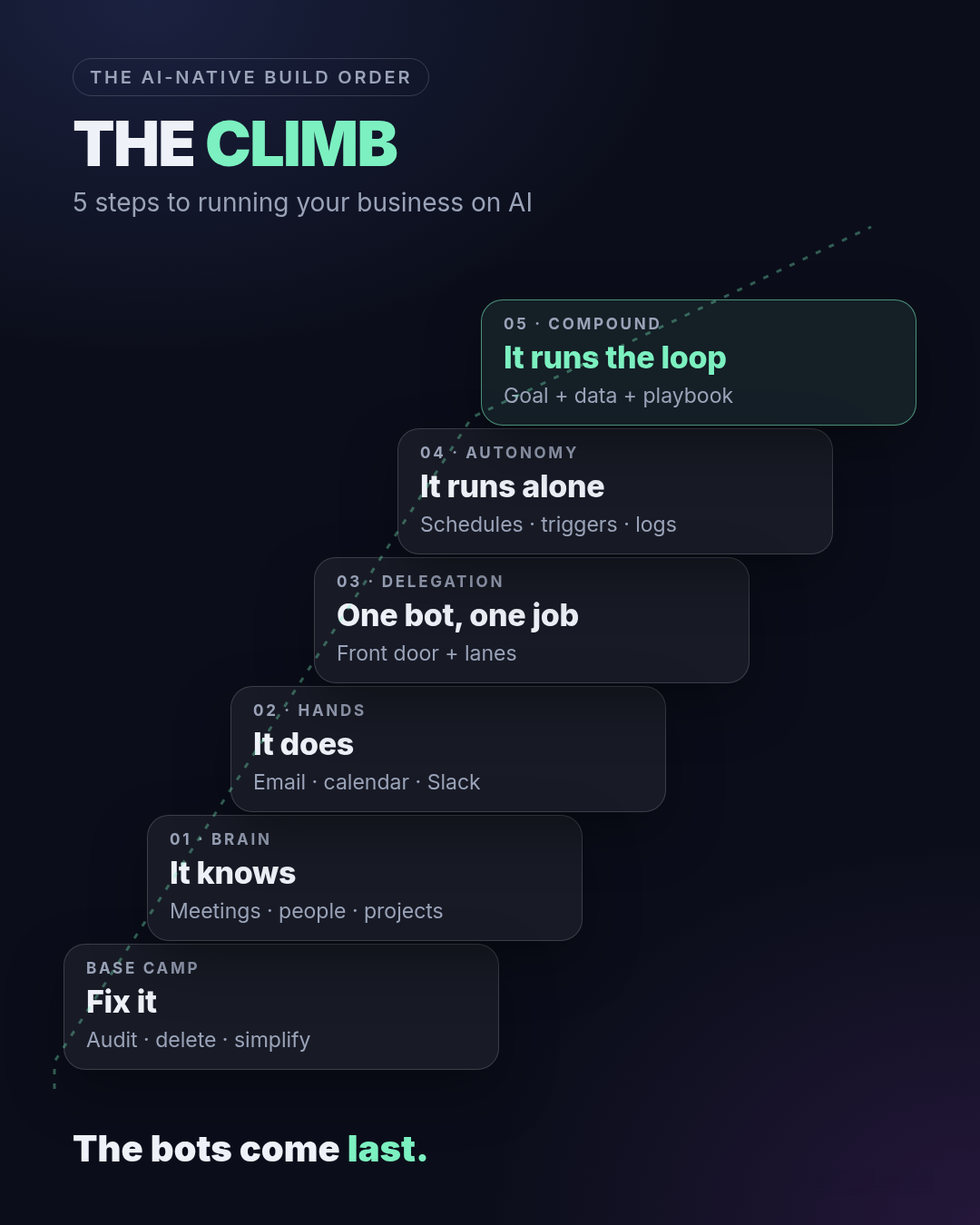
One shared brain. A team of bots. And the bots come last. This is the order our team uses to build an AI operated business, step by step, with the worksheets.
Our AI isn’t smarter than yours. It just has way more context. Same models, same apps, same price as everyone else. The difference is that ours already knows every meeting, every person, every project and how we do things before we type a word. You can’t buy that. You build it, in order.
Want our team to build it? See the done for you version
What you get
The files
- climb-framework.pngThe full visual board: every step on one image.
- base-camp-worksheet.mdBase Camp: list every process, then keep, delete or simplify.
- bot-brief.txtStep 3: the one page brief every bot gets.
- schedule-sheet.mdStep 4: fill this in before you automate anything.
- 00-README.mdThis whole guide as one file, with the diagrams.
Every file, with a download and a copy button, is in the full setup below.
The visual board
The whole climb on one page
The one rule
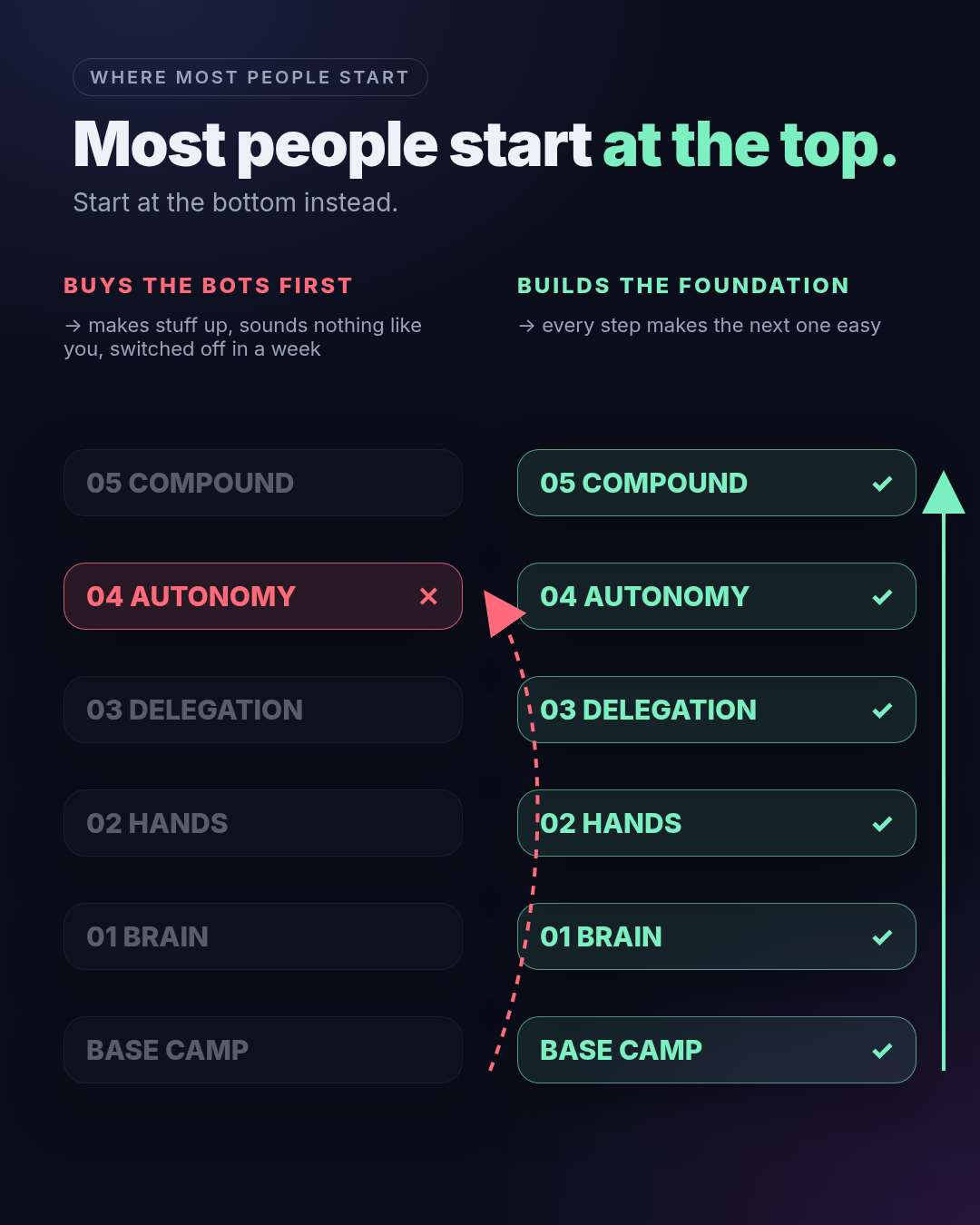
The bots come last
Everybody wants to start at autonomy: the agents, the automations, the stuff that runs while you sleep. So they buy the bots first, drop them into a messy business, and the bots make things up, sound nothing like them, and get switched off in a week.
The bot was never the problem. It didn’t know anything, and the business it landed in was a mess. So you climb in order. Fix the business. Give the AI a brain. Give it hands. Then hand it whole jobs. Then let it run. Then let it compound.
The one number to watch: how much of your week happens without you pressing go. The order matters more than the tool. You can run every step on Claude Code, Codex, Grok Bot, whatever.
The six levels
Where you are, what the AI does
| Level | Who you are | What the AI does | Your week looks like |
|---|---|---|---|
| Base Camp | The Juggler | Nothing yet (on purpose) | You're in every task. Stuff lives in six apps and your head. Fridays are catch up. |
| 01 Brain | The Librarian | Answers from your notes | You never re-explain your business. "What did we decide?" takes ten seconds. |
| 02 Hands | The Operator | Does tasks in your real tools | You review drafts instead of writing them. |
| 03 Delegation | The Dispatcher | Owns whole jobs, one bot per lane | You message one bot and the work goes to the right specialist. |
| 04 Autonomy | The Architect | Runs on schedules and triggers | You read the log, not the inbox. |
| 05 Compound | The Owner | Runs the loop toward a goal | Output keeps going up; your hours don't. |
2 minute self check
Where are you right now?
- I have a one page list of every recurring task and tool
- My top processes are written down as steps
- AI can answer "what did we decide with ___?" from my own notes
- AI is connected to at least one real tool and finishes a task end to end
- Work routes to the right bot without me deciding each time
- At least one workflow runs on a schedule or trigger, with a log
- One core output runs as a loop I only approve
Your level is the first No. Start there. Not at the bots.
Continue the setup
Unlock the full guide
Get every setup step, prompt, checklist, and local download.
By unlocking, you agree to get emails from QWave Labs about new free tools, tips and offers. Unsubscribe anytime. Privacy policy
Free
The files and the full board
- climb-framework.pngThe full visual board: every step on one image.Download
- base-camp-worksheet.mdBase Camp: list every process, then keep, delete or simplify.Download
- bot-brief.txtStep 3: the one page brief every bot gets.Download
- schedule-sheet.mdStep 4: fill this in before you automate anything.Download
- 00-README.mdThis whole guide as one file, with the diagrams.Download
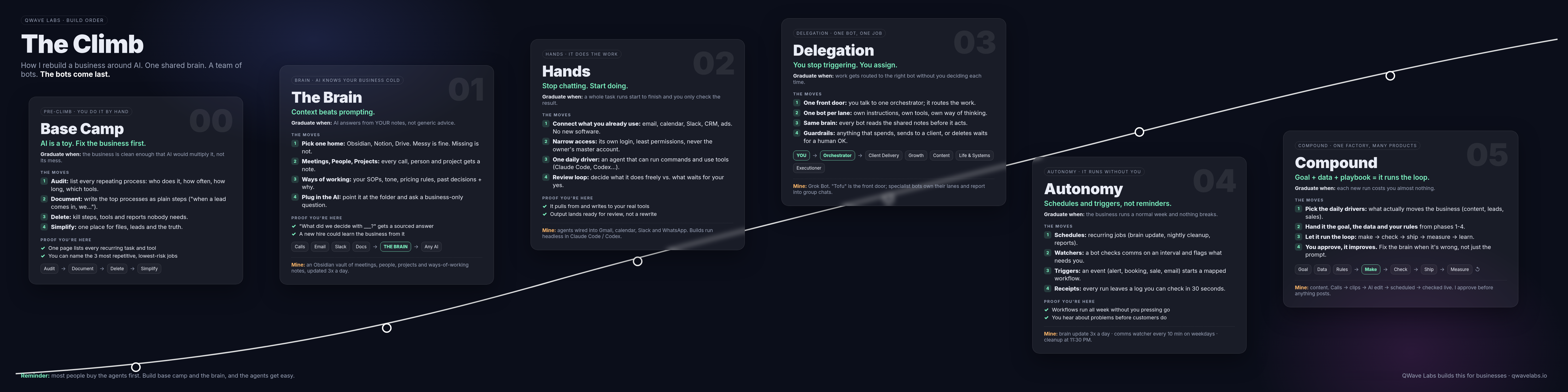 (opens full size in a new tab)
The worksheets and the bot brief are also below in full, with a copy button on each one.
Step by step
Climb it in order
Step 0
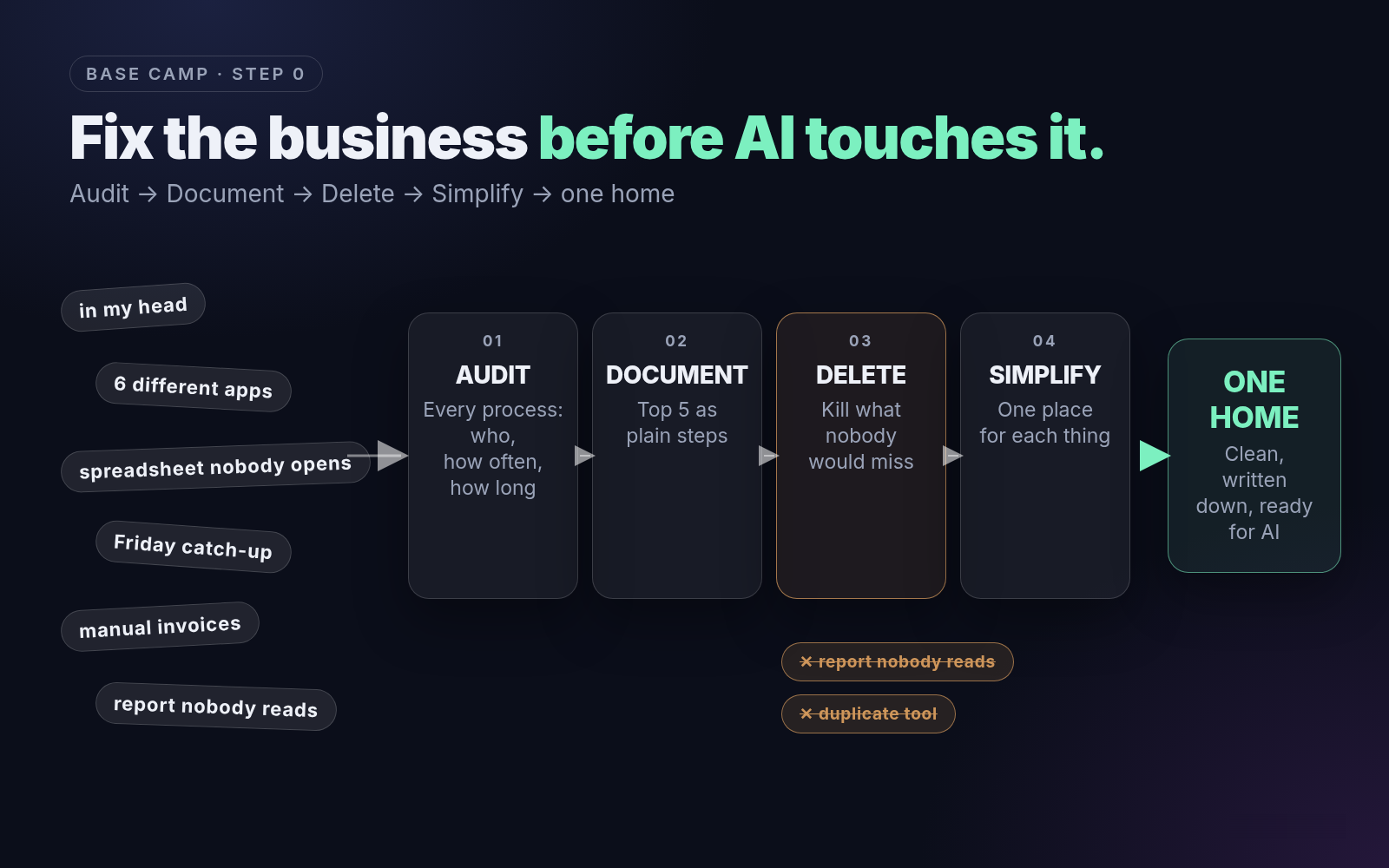
Base Camp: fix the business before AI touches it
The step that has nothing to do with AI. Write down every process the business actually runs, kill what you don't need, and simplify what's left. A process is anything that repeats: following up a lead, sending an invoice, posting a reel, paying a bill.
- What tool to use: a spreadsheet or a single note. Seriously. No AI yet.
- What we recommend: one table, filled in honestly. Not what's supposed to happen. What actually happens.
How to structure it
- Audit: list every recurring process, who does it, how often, how long it takes, which tools it touches.
- Document: write your top 5 as plain steps: "When a lead comes in, we..."
- Delete: kill the steps, tools, subscriptions and reports nobody would miss. Delete before you simplify. Simplify before you automate.
- Simplify: one place for files, one for leads, one for tasks. Pick the home your brain will live in.
Graduate when the business is clean enough that AI would multiply it, not its mess.
Proof you’re here: one page lists every recurring task and tool, and you can name the three most repetitive, lowest risk jobs.
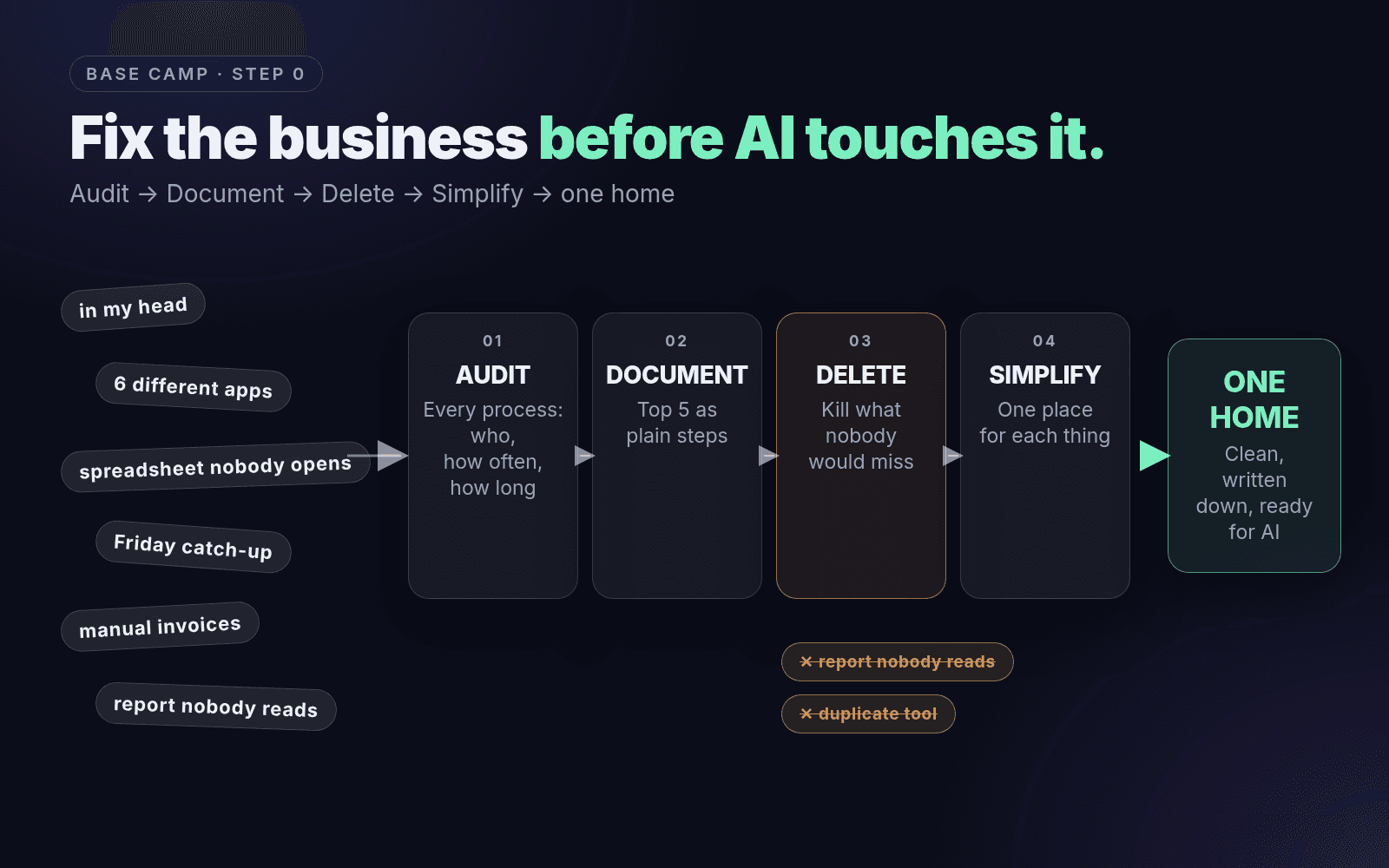 (opens full size in a new tab)
Base Camp worksheetbase-camp-worksheet.mdDownload # Base Camp worksheet Every recurring process, honestly. Not what's supposed to happen. What actually happens. | Process | Who does it | How often | Time each | Tools it touches | Keep / Delete / Simplify | AI candidate? | |---|---|---|---|---|---|---| | e.g. new lead follow-up | me | daily | 20 min | email, CRM | Simplify | yes, low risk | | | | | | | | | | | | | | | | |Step 1
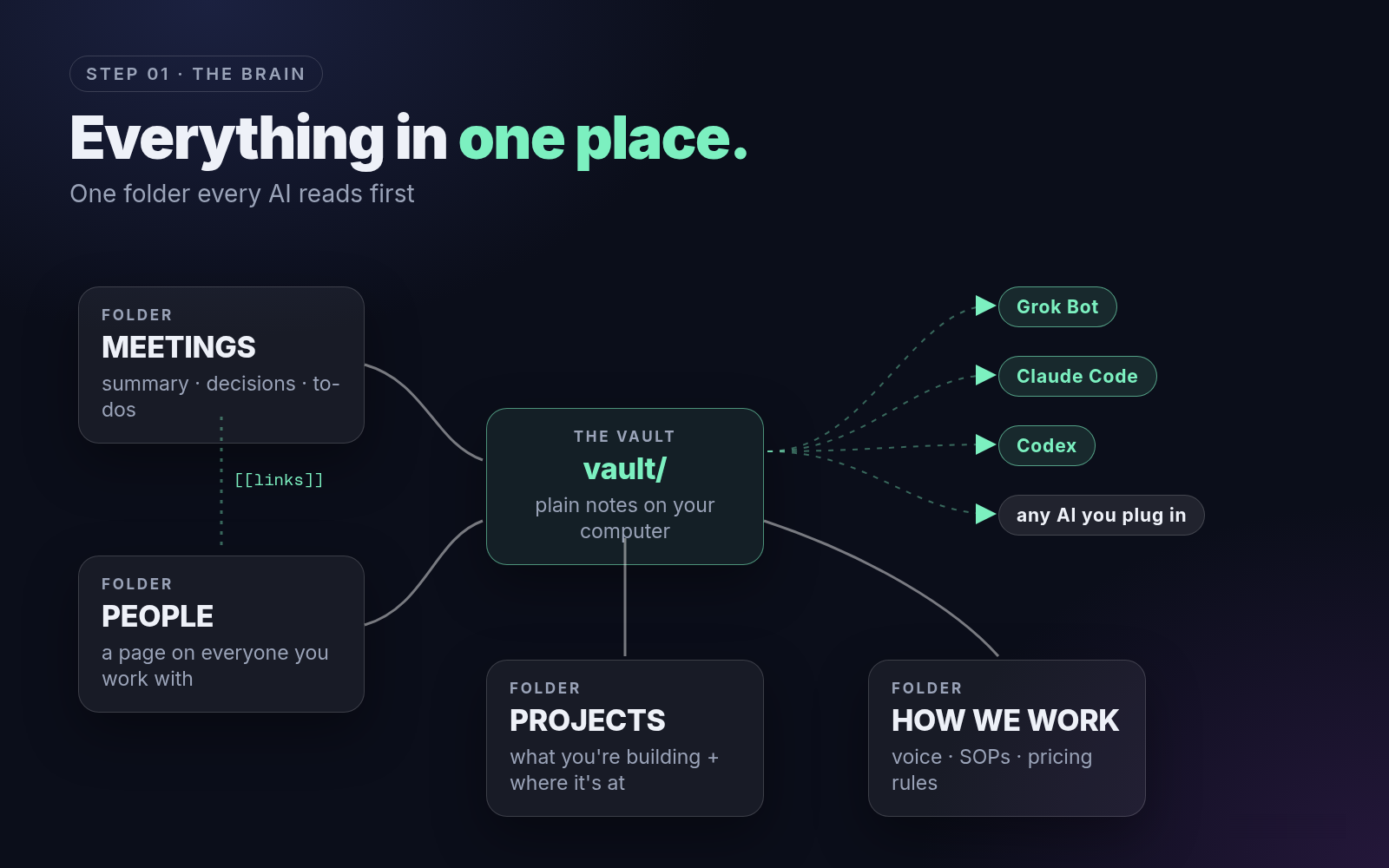
The Brain: everything in one place
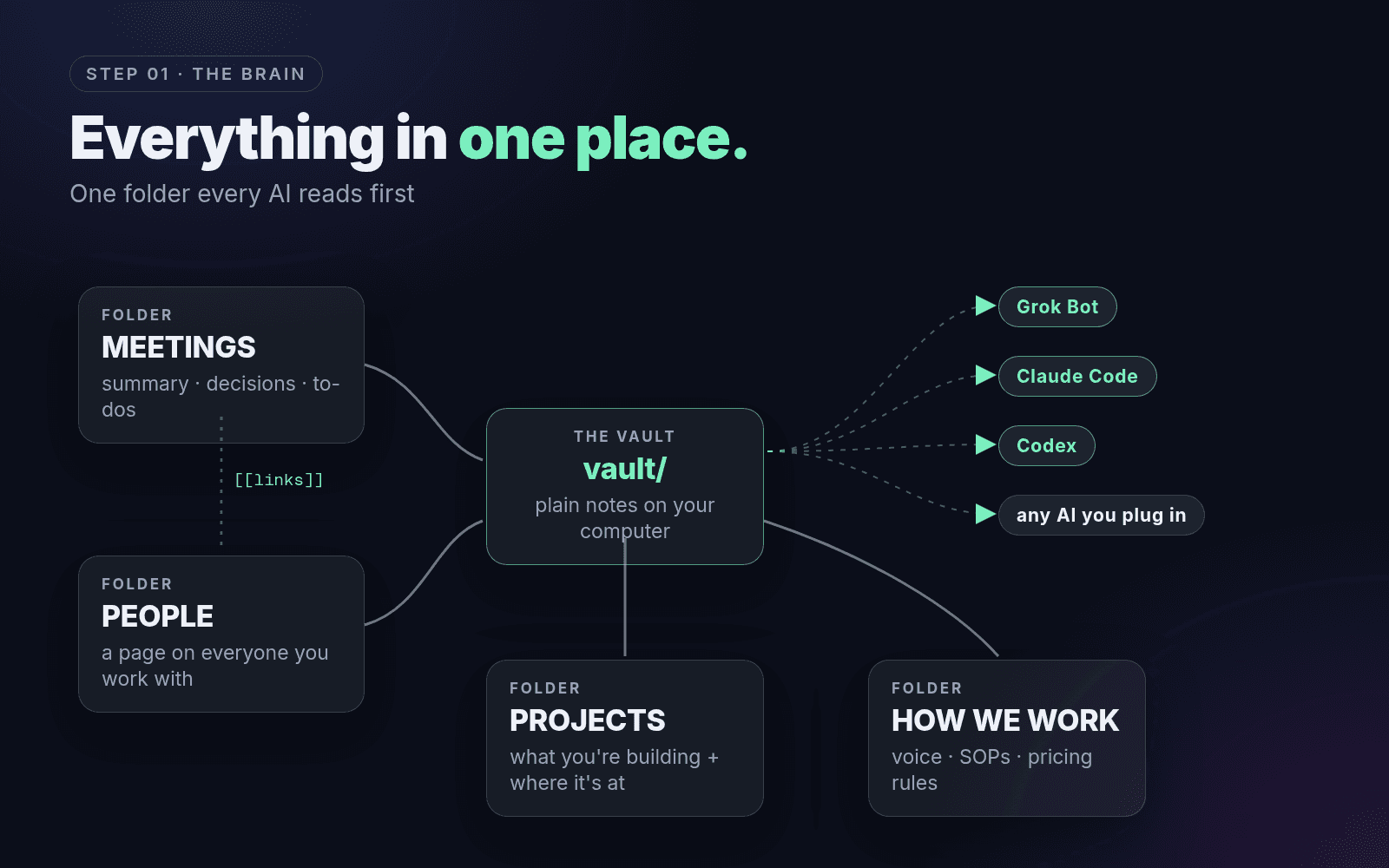
Every meeting, every person, every project, and how you do things (your SOPs, how you talk to customers, pricing rules, past decisions with the reason), in one place. Once that exists, any AI you plug in already knows how you work. More context beats a better prompt every time.
- What tool to use: Obsidian (free, plain files, any AI can read it). Notion or Google Drive work too. Messy is fine. Missing is not.
- What we recommend: Obsidian. Our team runs the business from one vault, and Grok Bot, Claude Code and Codex all read the same folder. If we switch AIs tomorrow, the brain comes with us.
How to structure it
- Make the vault with three main folders: Meetings, People, Projects.
- Meetings: every call lands here with a summary, decisions and to-dos.
- People: a page on everyone you work with. Projects: everything you're building and where it's at.
- Add one "How we work" page, then point your AI at the folder and ask: "What did we decide with [person] and what's still open?"
Graduate when the AI answers from your notes, not generic advice.
Proof you’re here: that question gets an answer with the note it came from, and a new hire could learn the business from the brain.
 (opens full size in a new tab)
The full vault setup, with the folders, the filing rules and the ask prompt, is on the VAULT page.
Step 2
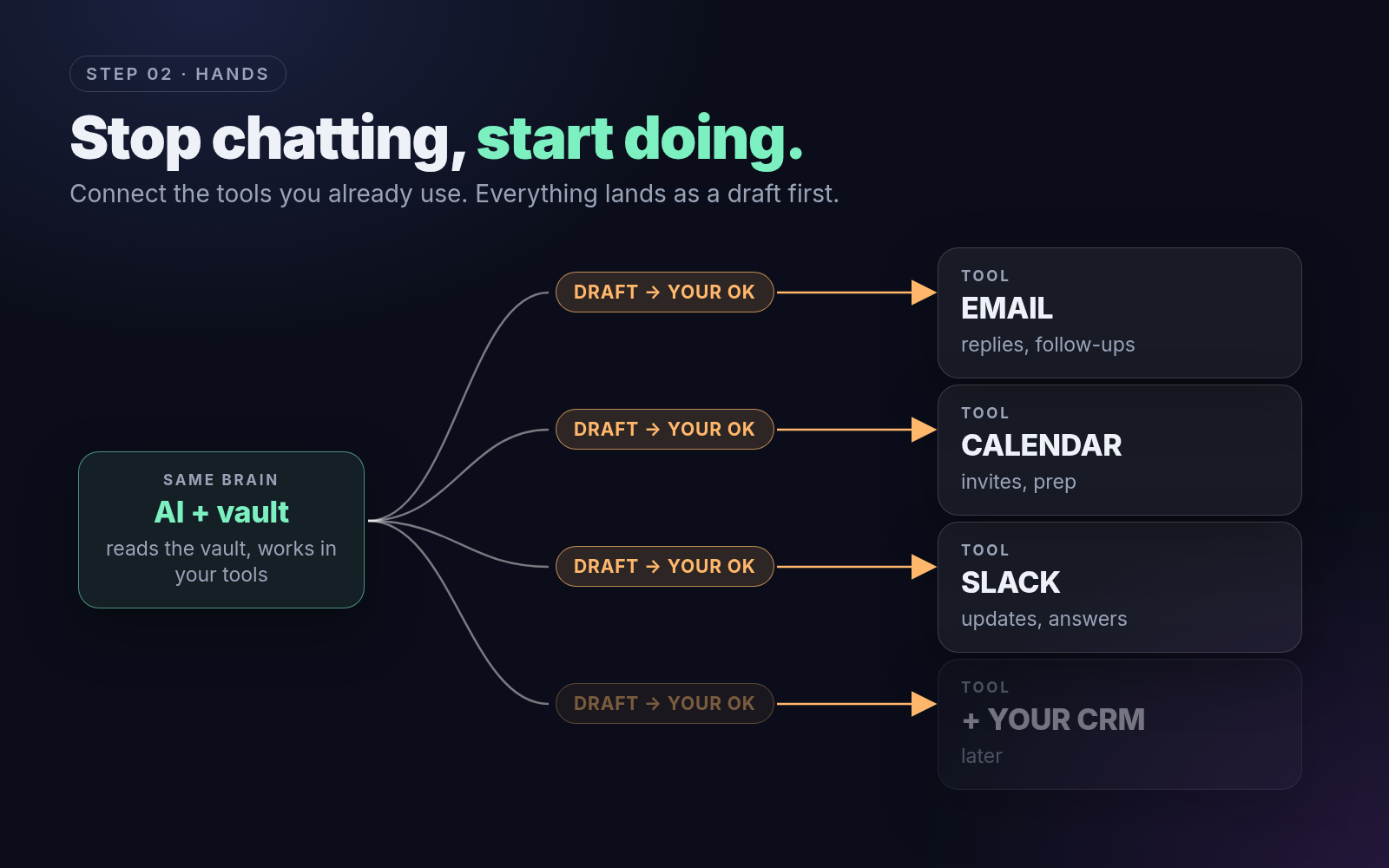
Hands: stop chatting, start doing
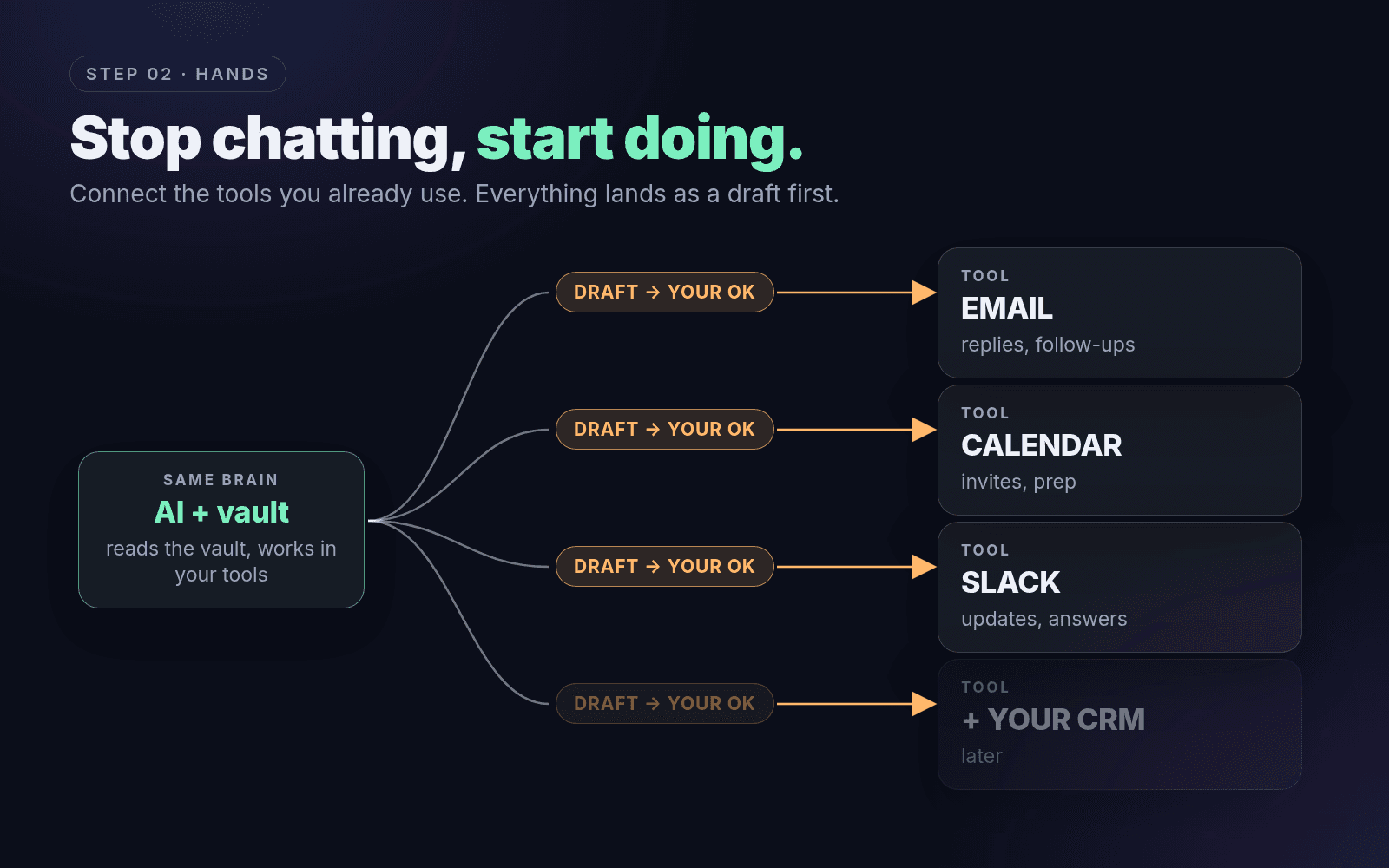
Connect the AI to the tools you already use (email, calendar, Slack) so it actually does the work instead of just chatting about it. Everything lands as a draft first, and it waits until you say go.
- What tool to use: an agent that can actually run things: Claude Code, Codex, Grok Bot or similar, working inside the brain folder, with connectors to your tools.
- What we recommend: start with email and calendar. They're where most of your week goes, and drafts are easy to review.
How to structure it
- Connect what you already use. Email, calendar, Slack. No new software.
- Narrow the access. Its own login, read only wherever you can, write access only where it saves real time. Never your master account.
- Give it a working folder next to the brain, with one file per repeatable task.
- Write the review rule down: what it can do freely, and what waits for your yes.
Graduate when a whole task runs start to finish and you only check the result.
Proof you’re here: it pulls from and writes to your real tools, and its output lands ready to send, not ready to rewrite.
 (opens full size in a new tab)
Your first three hands jobs (pick one, run it this week)
Inbox triage: "Read today's unread email. Draft replies for anything routine, flag anything that needs me, and give me a 5 line summary. Don't send anything."
Call prep: "For each meeting on my calendar tomorrow, read the person's page and our last meeting in the vault, and write me a 5 bullet prep note."
After call follow up: "File this call transcript into the vault, then draft the follow up email with the decisions and to-dos. Leave it in drafts."
Step 3
Delegation: one bot, one job
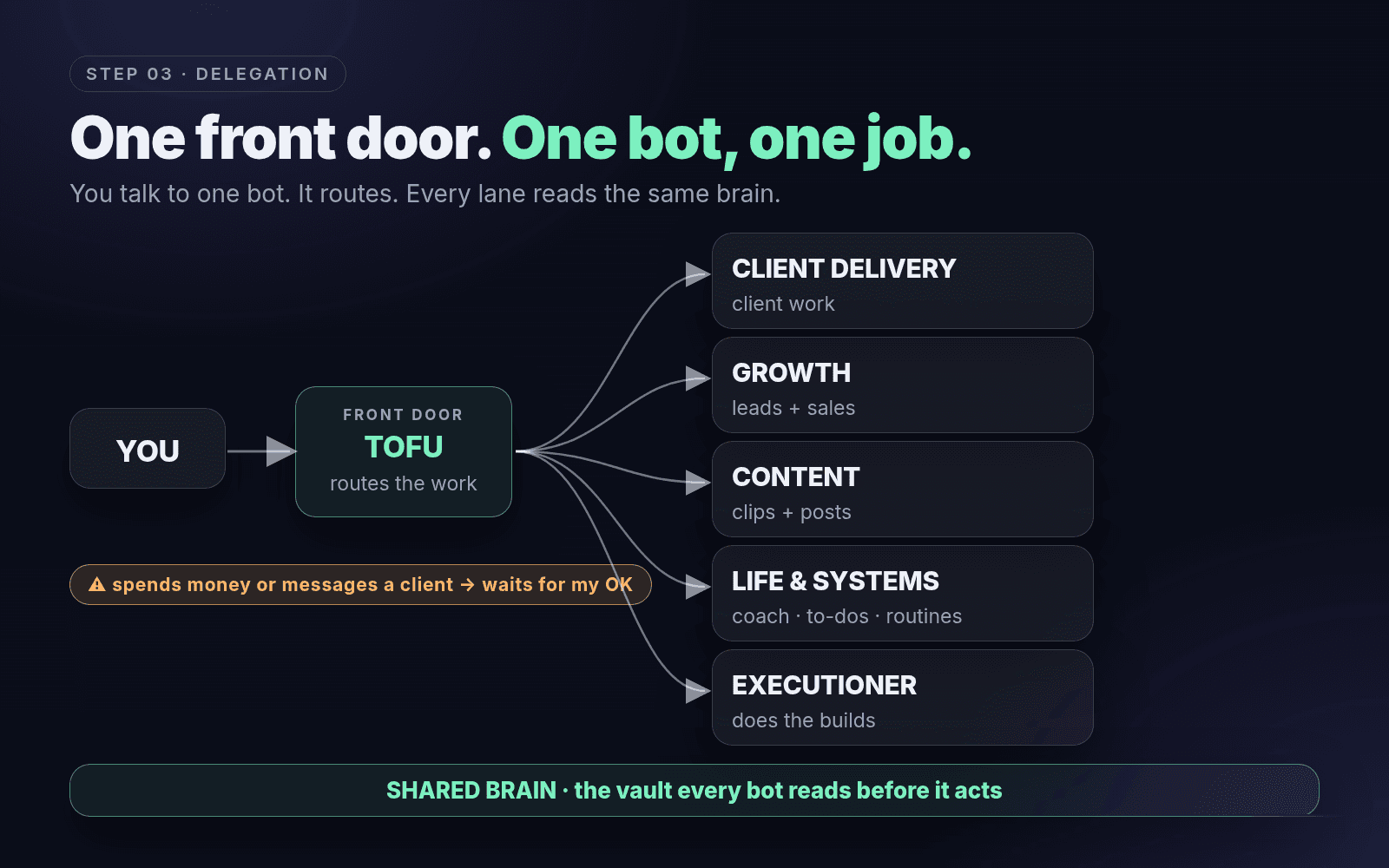
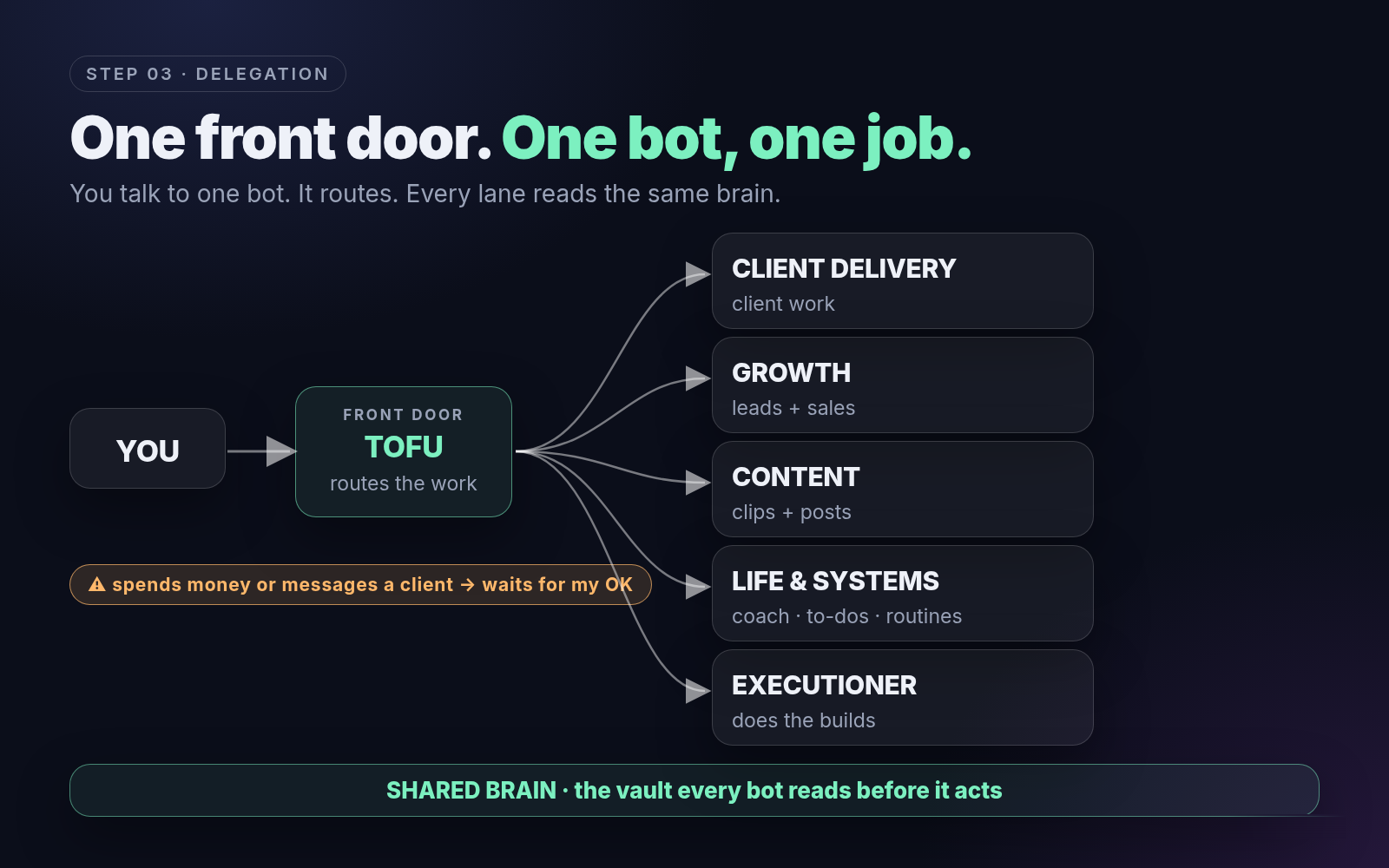
Now you assign whole jobs. One front door: you message one bot and it routes the work to the right specialist. One bot per job, each with its own instructions, its own tools and its own lane. They all read from the same brain.
- What tool to use: anything that lets you run more than one agent with separate instructions: Grok Bot, Claude Code, Codex, whatever.
- What we recommend: don't build one giant bot that does everything. Build a front door and a few lanes, and add lanes only when one gets crowded.
How to structure it
- One front door. You message one bot. It routes.
- One bot per lane. Client Delivery, Growth, Content, Life and Systems, and an Executioner that just does the builds.
- Same brain. Every bot reads the vault before it acts, so none of them start from zero.
- Guardrails. Anything that spends money or messages a client waits for approval.
Graduate when work gets routed to the right bot without you deciding each time.
Proof you’re here: you send one message and the right bot does the job, in its lane, using the brain.
 (opens full size in a new tab)
The one page bot briefbot-brief.txtDownload NAME: [lane] bot YOU OWN: [the whole job, e.g. "weekly client updates"] READ FIRST: AGENTS.md, then [the vault folders you need] TOOLS: [only the ones this job needs] DONE LOOKS LIKE: [the output, where it lands, by when] ALWAYS ASK ME BEFORE: spending money, messaging a client, deleting anything REPORT: one line in logs/ every time you runThe life lane matters as much as the business lanes. Our team runs our AI accountability coach, a to-do app and our routines. Organizing your life is half the point.
Where the DIY gets heavy: briefs for every bot, routing rules, permissions per tool, approvals that actually hold. If you’d rather have it built around your business, that’s what our team does. Book a call with our team
Step 4
Autonomy: it runs without you
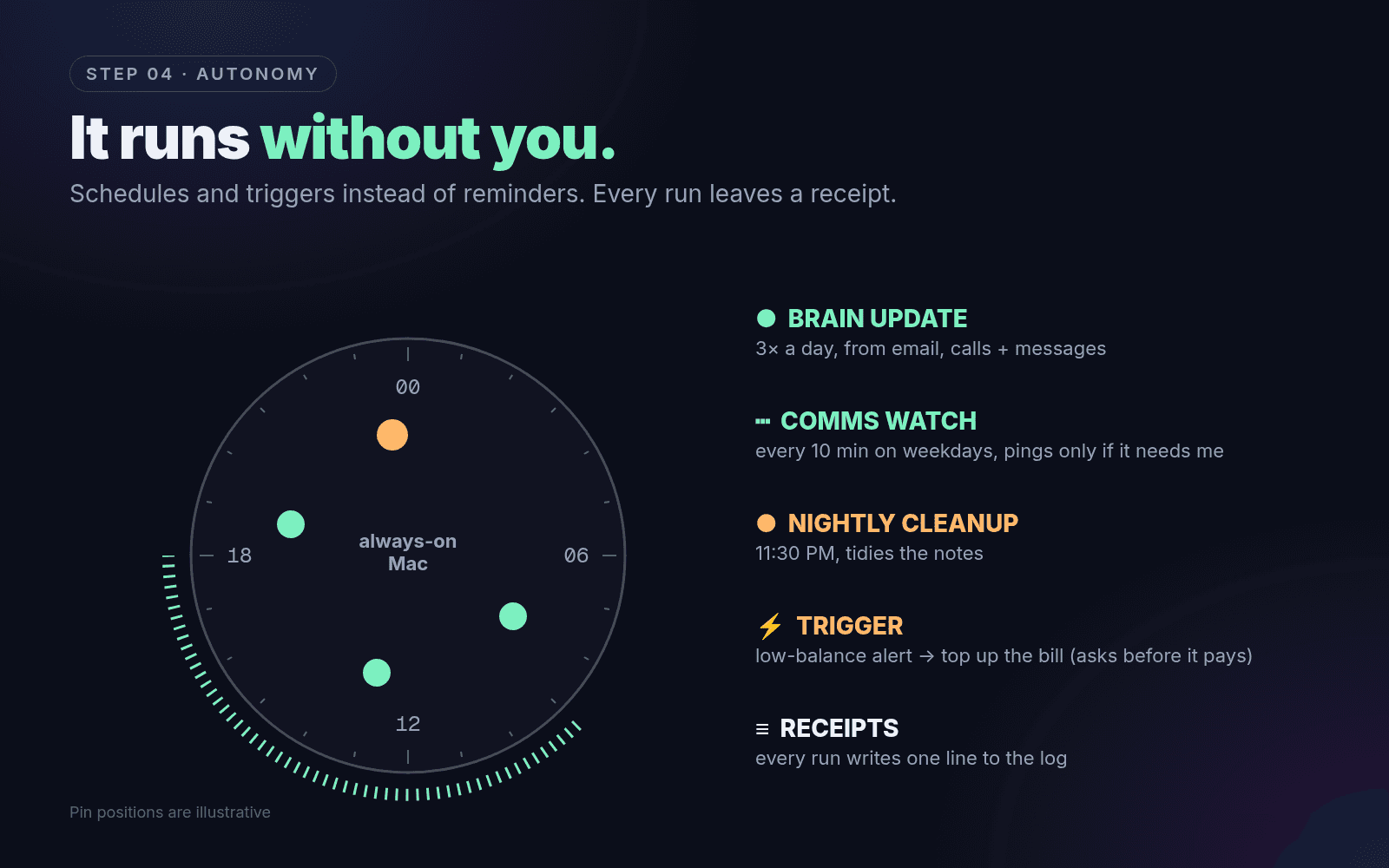
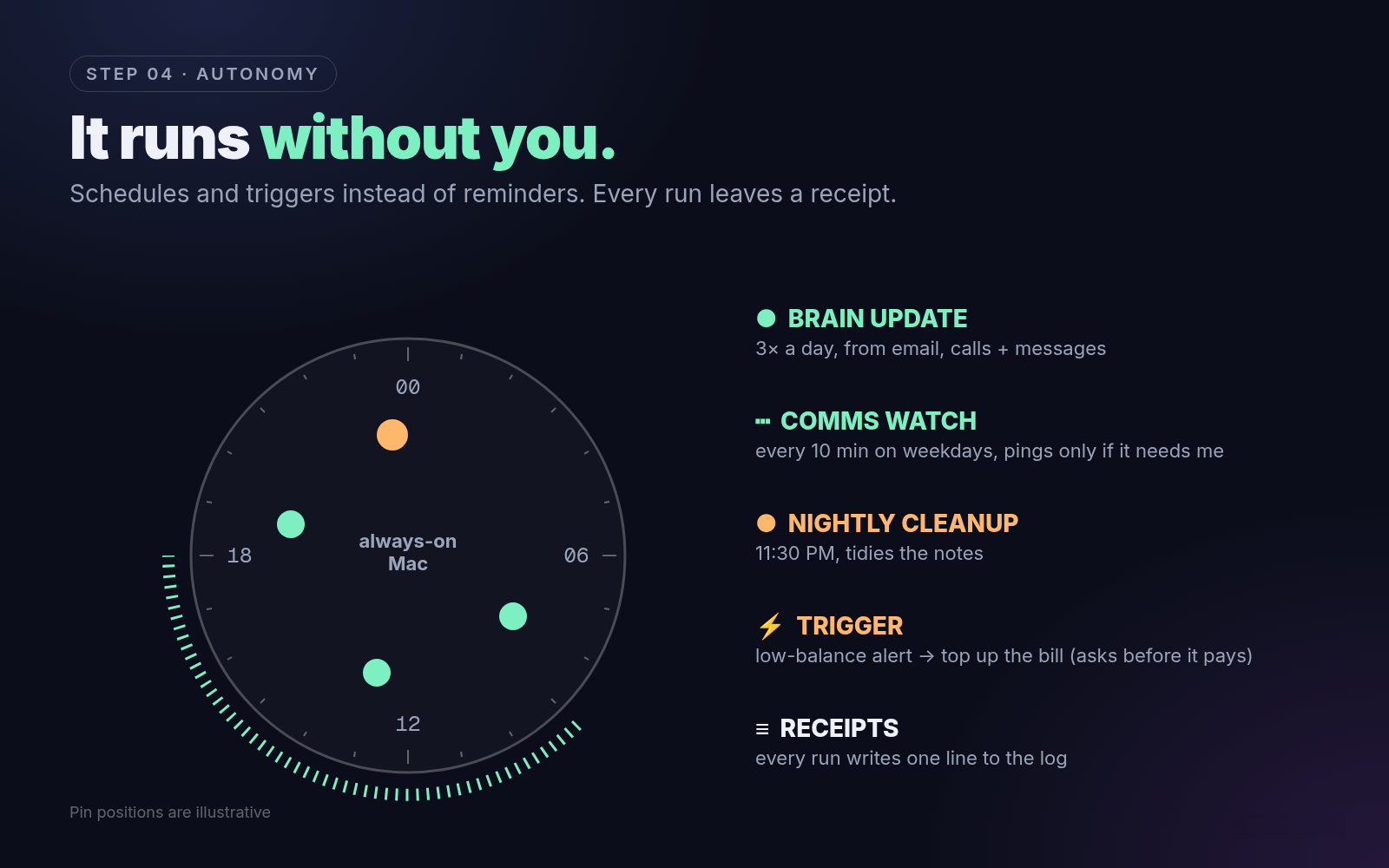
The part everyone wants, and everyone jumps straight to. It only works now because steps 1 to 3 exist. The system runs on schedules (a set time), watchers (check on an interval, only ping you when it matters) and triggers (an event starts a workflow), and every run leaves a receipt in a log.
- What tool to use: scheduled tasks in your agent (Claude Code, Codex, Grok Bot), or plain cron or launchd, on a computer that's always on.
- What we recommend: one always on machine. Start with one schedule and one watcher, then add.
How to structure it
- Schedules: three times a day, our team brain updates itself from email, calls and messages. Every night it cleans up the notes.
- Watchers: every ten minutes on weekdays, a bot checks our team's comms and only pings us if something needs us.
- Triggers: when a low balance alert hits one of our bills, a bot tops it up. And it asks us before it pays.
- Receipts: every run writes one line to the log. We can scan a whole day in 30 seconds.
Graduate when the business runs a normal week and nothing breaks.
Proof you’re here: workflows run all week without you pressing go, and you hear about problems before your customers do.
 (opens full size in a new tab)
Pin positions are illustrative. Schedule sheetschedule-sheet.mdDownload # Schedule sheet Fill this in before you automate anything. | Job | When | What it reads | What it does | Waits for my OK? | Log line | |---|---|---|---|---|---| | Brain update | 3× a day | email, call transcripts, messages | files them into the vault | no (only writes notes) | "filed 6 items: [[links]]" | | Comms watch | every 10 min, weekdays | inbox + DMs | pings me only if something needs me | no (only notifies) | "2 flagged, 14 ignored" | | Nightly cleanup | 11:30 PM | the vault | merges duplicates, fixes links, lists stale projects | yes, for merges | "3 fixes proposed" | | [your trigger] | when [event] happens | [source] | [action] | **yes if it spends or sends** | "[what happened]" |To set one up, tell your agent: "Every night at 11:30 PM, run [job] from skills/[job].md. Write one line to logs/ with what you did. Never send, pay or delete without asking me."
Step 5
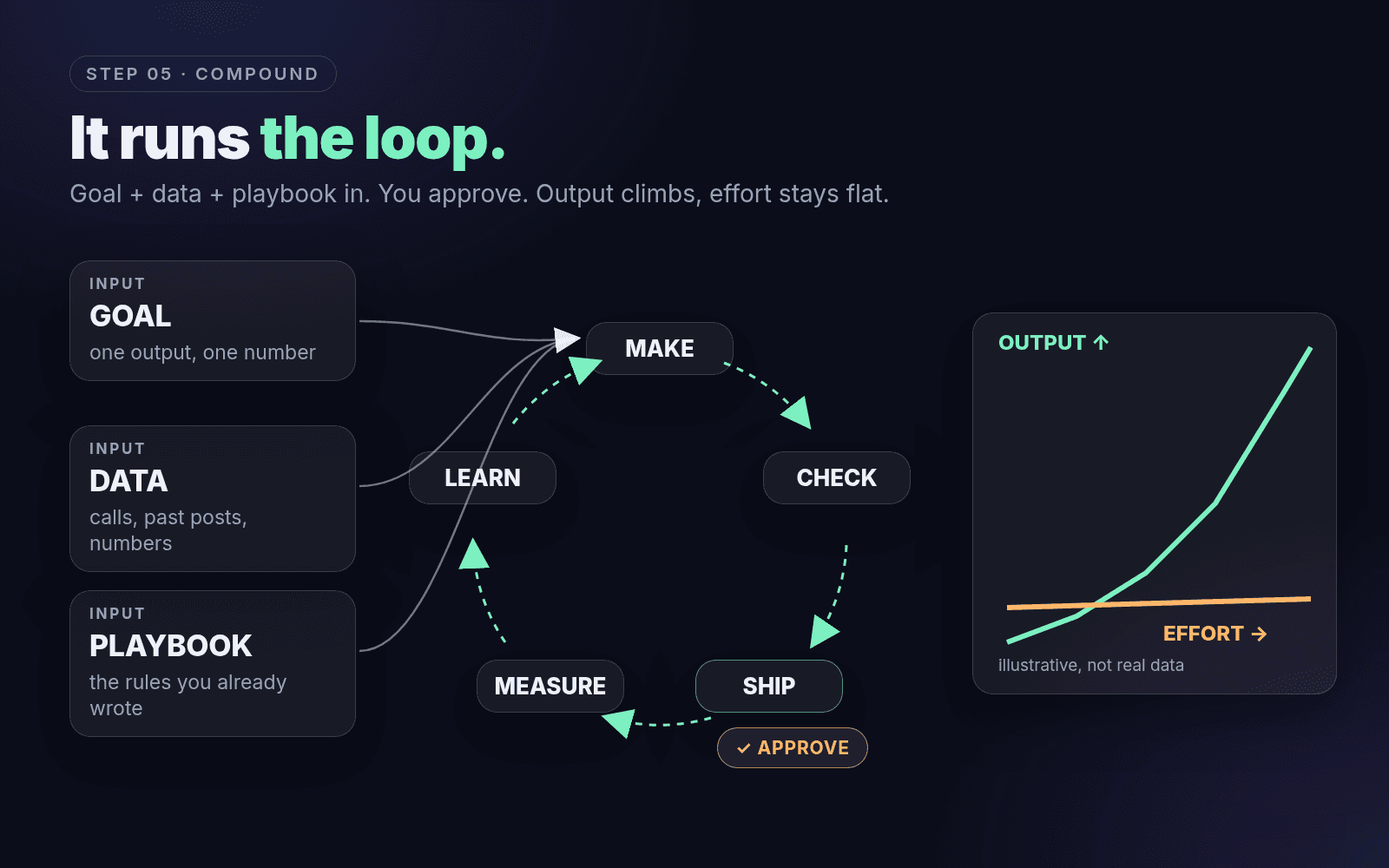
Compound: it runs the loop
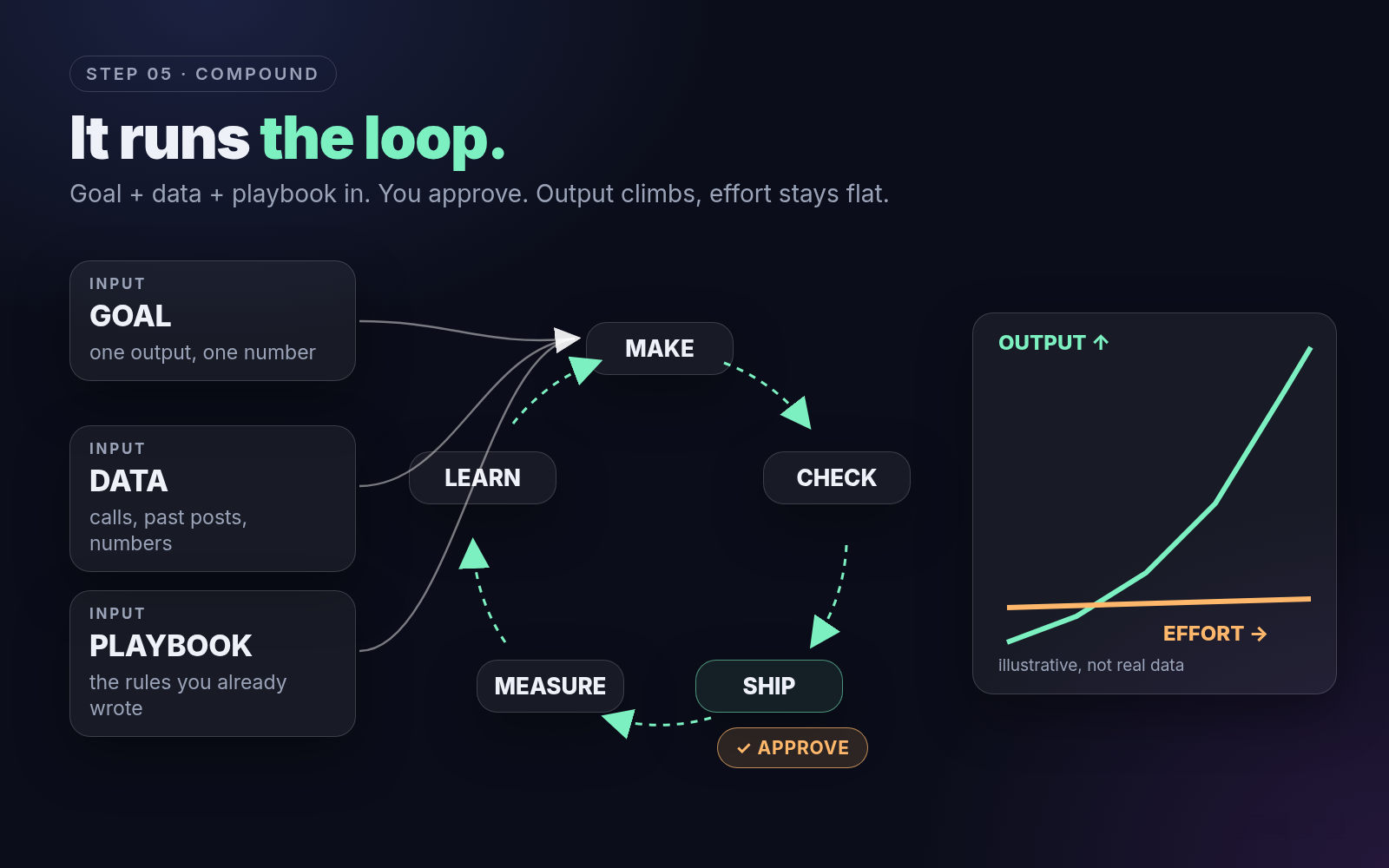
Once the foundation exists, every new run costs almost nothing. You give the system a goal, the data and your playbook, and it runs the loop: make, check, ship, measure, learn. Output compounds. Your effort stays flat.
- What tool to use: the same stack you already built. Compound isn't a new tool. It's the brain, hands, bots and schedules pointed at one goal.
- What we recommend: pick one loop that actually moves the business (content, leads, sales or delivery) and run it until it's boring before you start a second.
How to structure it
- Pick the goal. One output, one number.
- Hand it the data and the rules. Your calls, your past posts, your playbook.
- Let it run the loop. Our team’s content loop turns calls into clips, the bots edit them, schedule them, and check they went live. Once a week a research run tells us what’s working in our niche (that’s our REMAKE kit).
- You approve, it improves. When something's wrong, fix the brain (the rule, the example, the SOP), not just the prompt, so it's fixed for every run after.
Graduate when you're approving output, not producing it.
Proof you’re here: one core output runs as a loop you only approve, and it gets better week over week.
 (opens full size in a new tab)
Where to start today
The next 7 days
In the next 24 hours
- Fill in the Base Camp worksheet. Every recurring process, honestly.
- Delete three things nobody would miss: a step, a tool, a report.
- Pick the one home your brain will live in (we’d pick Obsidian).
In the next 7 days
- Build the brain: Meetings, People, Projects, plus one "How we work" page. File your last 5 calls.
- Connect your AI to email or calendar and run one real task end-to-end, as a draft.
- Write down your approval rule: what it does alone, what waits for you.
Then
- One front door, one bot per lane, one brief each.
- One schedule, one watcher, one log.
- One loop pointed at the goal that matters most.
The stack
What our team uses, not what you have to use
| Job | What our team uses | Swap for |
|---|---|---|
| The brain | Obsidian vault | Notion, Google Drive |
| Front door and bots | Grok Bot (the front door routes to the lanes) | Any multi agent setup |
| Building and coding | Claude Code, Codex | Cursor, any coding agent |
| Always on machine | A Mac that never sleeps | Any spare computer or a cloud server |
| Hands | Email, calendar, Slack connectors | Whatever tools you already use |
| Life lane | AI accountability coach, to-do app, routines | The free COACH setup |
Tools change every month. The order doesn’t.
Go deeper
The free pieces
- The brain: our full Grok Bot and Obsidian vault setup
- The life lane: the free AI accountability coach
- The content loop: how we pick every reel we film (code and guide)
Done for you
Want it done for you?
You can climb this yourself. If you'd rather have it done right the first time, that's what our team does.
Book a call with our teamWho it’s for
Founders, creators and small teams who are running something real, feel the AI wave, and want a system that actually knows their business, without spending months wiring it up.
What you get
- Base Camp done with you: we map your processes and cut what you don't need
- The brain: one organized home for your meetings, people, projects and how you work, with your existing calls and notes filed in
- Hands: your AI connected to the tools you already use, with approval rules so nothing spends or sends without your OK
- Your first lanes and schedules, plus the daily accountability coach on top
- A walkthrough so you know exactly how to run it
What happens on the call
We look at how you work today, where things live and what eats your week, and work out which level you're at. We tell you what we'd build first. If it's a fit, we map out the build. If it's not, you still leave with the plan.