Free setup
Your AI vault setup
One folder for your meetings, people and projects. One rules file. An AI that already knows your business. Obsidian is free, and you can have this running tonight.
The goal isn’t to "build a second brain". It’s getting your life and business organized in one place, and having an AI that knows that context, so you stop re-explaining everything every time you open a chat. The vault is just how you get there.
Want our team to build it? See the done for you version
What you get
The files
- AGENTS.mdThe filing rules your AI follows. Goes in the vault root.
- ask-prompt.txtThe prompt that makes it answer only from your notes.
- vault-starter.zipThe empty vault: Inbox, Meetings, People, Projects, AGENTS.md, CLAUDE.md and Index.md. Unzip it and open it in Obsidian.
- 00-README.mdThis whole guide as one file.
Every file, with a download and a copy button, is in the full setup below.
Why Obsidian
It’s just a folder
- It’s just a folder. Every note is a plain markdown file on your own computer. No database, no account needed.
- Any AI can read it. Our team runs Grok Bot, and Claude Code and Codex work in the same folder. Swap AIs whenever you want; your notes stay put.
- Links are built in. Type [[Person Name]] and notes connect. Those links are how the AI follows a meeting to a person to a project.
The setup
Set it up once
Step 1
Make the vault
Download Obsidian at obsidian.md (opens in a new tab), choose Create new vault and call it
vault. Make four folders: Inbox, Meetings, People and Projects. Or grab vault-starter.zip from the full setup below, unzip it and choose Open folder as vault.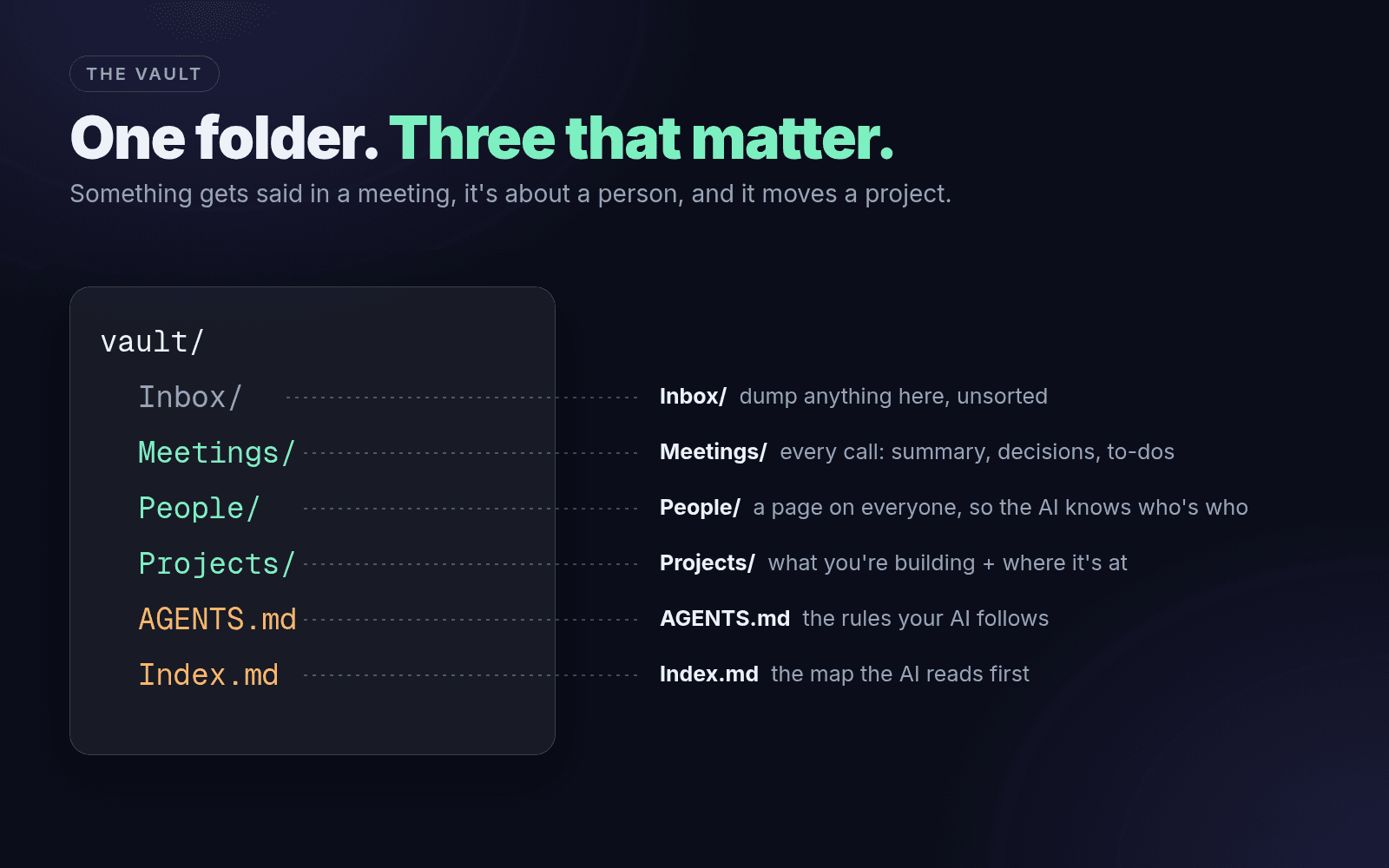 (opens full size in a new tab)
Three folders do the real work. Something gets said in a meeting, it’s about a person, and it moves a project. Link those three and your AI can answer almost anything about your business.
Step 2
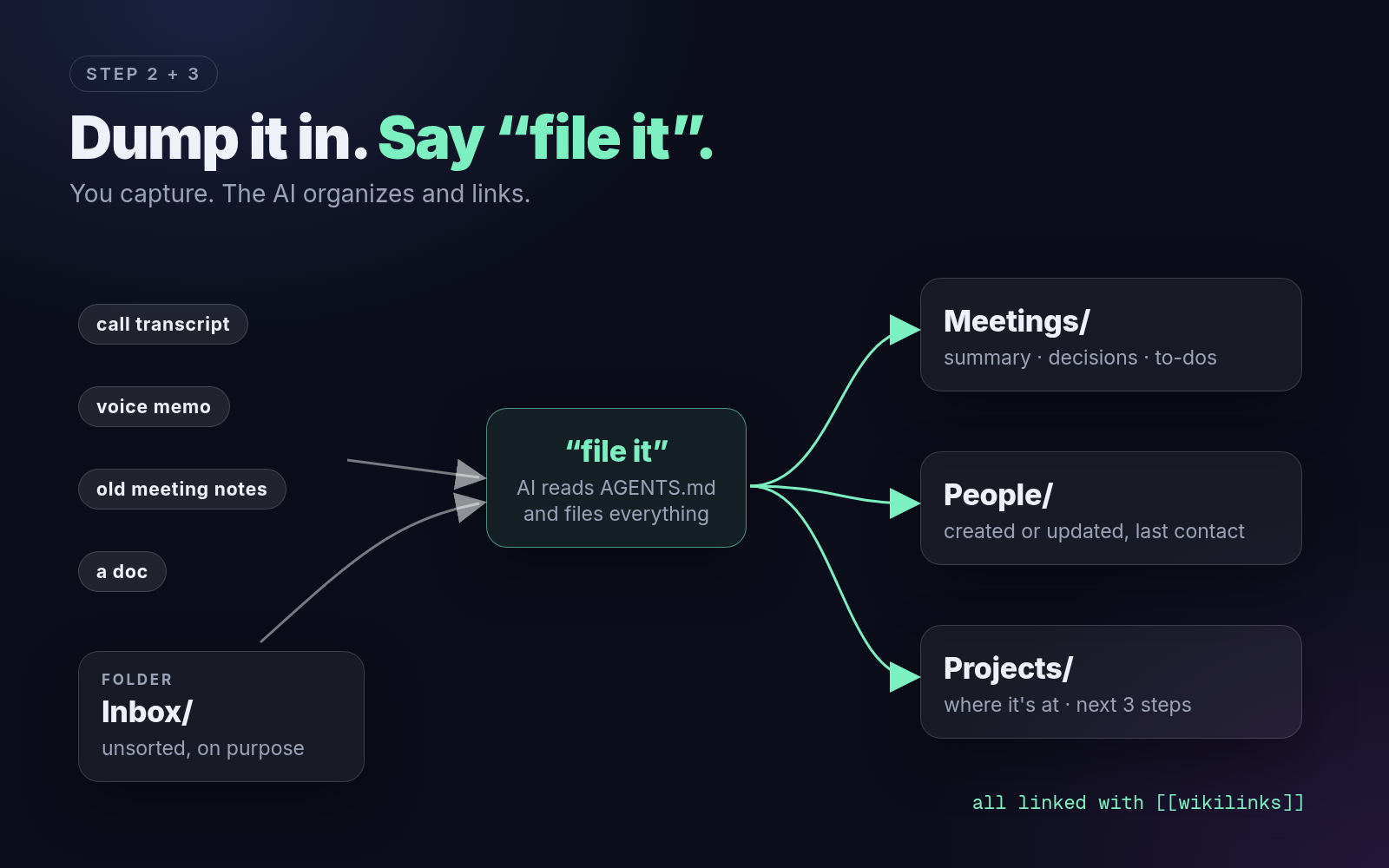
Capture into Inbox, don’t organize
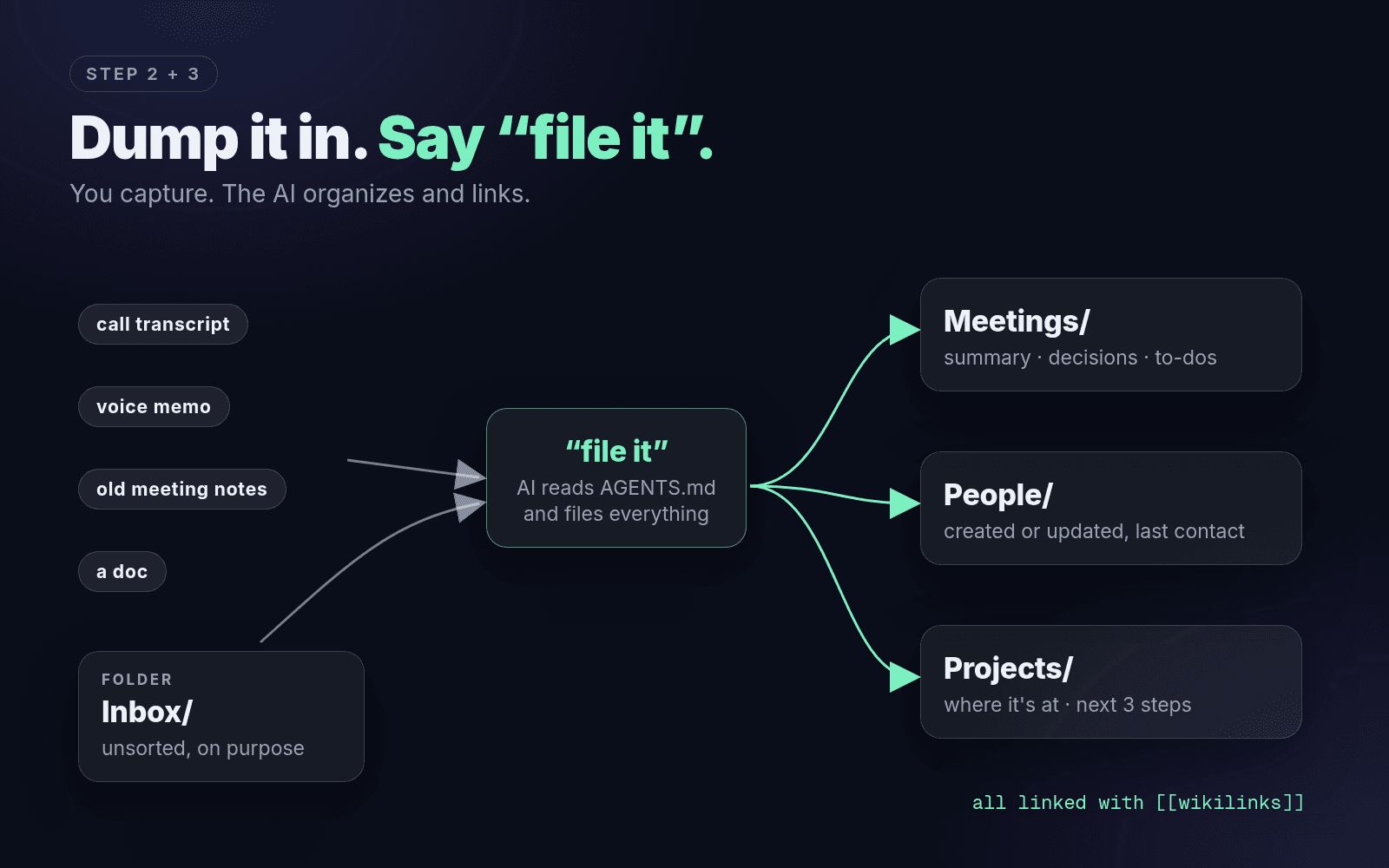
Paste in anything: call transcripts from whatever recorder you use (most export a transcript), old meeting notes, voice memo transcripts, docs. Don’t rename it, don’t sort it, don’t tag it. Filing is the AI’s job, not yours.
Do this tonight: export your last 3 call transcripts and drop them in Inbox, untouched. That’s enough for your AI to start answering "what did we decide?" the moment it has the filing rules.
Continue the setup
Unlock the full guide
Get every setup step, prompt, checklist, and local download.
By unlocking, you agree to get emails from QWave Labs about new free tools, tips and offers. Unsubscribe anytime. Privacy policy
Free
The files
- AGENTS.mdThe filing rules your AI follows. Goes in the vault root.Download
- ask-prompt.txtThe prompt that makes it answer only from your notes.Download
- vault-starter.zipThe empty vault: Inbox, Meetings, People, Projects, AGENTS.md, CLAUDE.md and Index.md. Unzip it and open it in Obsidian.Download
- 00-README.mdThis whole guide as one file.Download
The rules and the prompt are also below in full, with a copy button on each one.
Step 3
Save the filing rules as AGENTS.md
Make a note in the vault root called
AGENTS.mdand paste this in. Agents that work in a folder (Grok Bot, Claude Code, Codex) read it as their rules. If you use Claude Code, also save a copy asCLAUDE.md, since that’s the file Claude Code looks for.The filing rulesAGENTS.mdDownload # Vault rules You run my vault. It's how you know my meetings, people and projects. Folders: Inbox/ (unsorted), Meetings/, People/, Projects/. Index.md is the map. ## When I say "file it" 1. Read everything in Inbox/. 2. Each call or meeting becomes Meetings/YYYY-MM-DD Title.md using the Meeting template below: a 3-line summary, decisions (with the reason), to-dos (who, what, by when), open questions, and [[links]] to every person and project mentioned. 3. Every person mentioned gets a People/Full Name.md page (create it from the Person template if missing). Add the meeting link, update last_contact, add any open loops. 4. Every project touched gets its Projects/ page updated: "Where it's at", next 3 steps, and a dated line in the decisions log linking the meeting. 5. Keep my exact numbers, dates and quotes. Never round, never paraphrase a quote. 6. Update Index.md: every active project and person, one line each, as [[links]]. 7. When an item is filed, move it to Inbox/_filed/. Never delete anything without asking me. 8. Tell me what you created and updated, as a short list of [[links]]. ## When I ask a question - Answer only from the notes in this vault. Start at Index.md, then open only the notes you need. - Cite every fact with the [[note]] it came from. - If it's not in the vault, say "not in the vault". Never guess. - If the answer is useful, offer to save it as a new note linked to the notes you used. ## When I say "tidy" List duplicates, notes with no links, projects not updated in 30 days, and people with no last_contact. Don't change anything until I pick the fixes. ## Templates Meeting (Meetings/YYYY-MM-DD Title.md): --- type: meeting date: YYYY-MM-DD people: [[Person One]], [[Person Two]] projects: [[Project Name]] --- ## Summary (3 lines max) ## Decisions (and why) ## To-dos - [ ] Who: what, by when ## Open questions Person (People/Full Name.md): --- type: person company: role: last_contact: YYYY-MM-DD --- ## Who they are (1-2 lines) ## What they care about / how they like to work ## Open loops with me ## Meetings Project (Projects/Project Name.md): --- type: project status: active | waiting | done updated: YYYY-MM-DD --- ## Goal (one sentence) ## Where it's at ## Next 3 steps ## Decisions log - YYYY-MM-DD: decided X because Y ([[meeting link]]) ## People ## Rules - Plain markdown only. Use [[wikilinks]] for every person, project and meeting. - Never store passwords, card numbers or logins in notes. - Ask before anything that sends, pays or deletes.Point your AI at the vault
- Claude Code or Codex: open a terminal in the vault folder and run
claudeorcodex. They pick up the rules file on their own. Then typefile it. - Grok Bot: give it access to the vault folder and tell it to read AGENTS.md first.
- ChatGPT or Claude Projects: paste AGENTS.md into the project instructions, upload your notes as project files, and paste in new transcripts. It can’t write files, so copy its notes back into Obsidian. Fine to start, but an agent that works in the folder is the real thing.
 (opens full size in a new tab)
- Claude Code or Codex: open a terminal in the vault folder and run
Step 4
Ask it anything
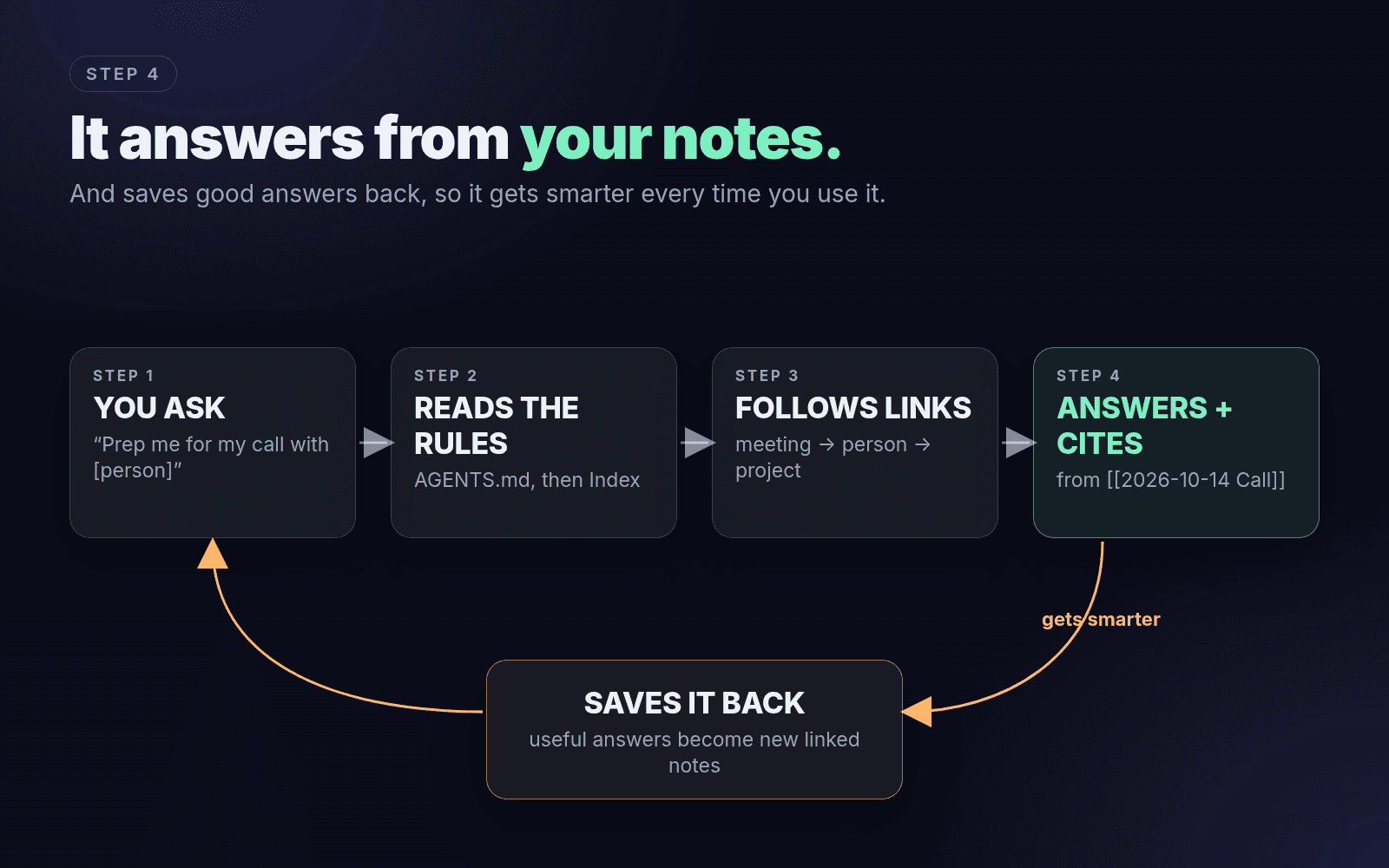
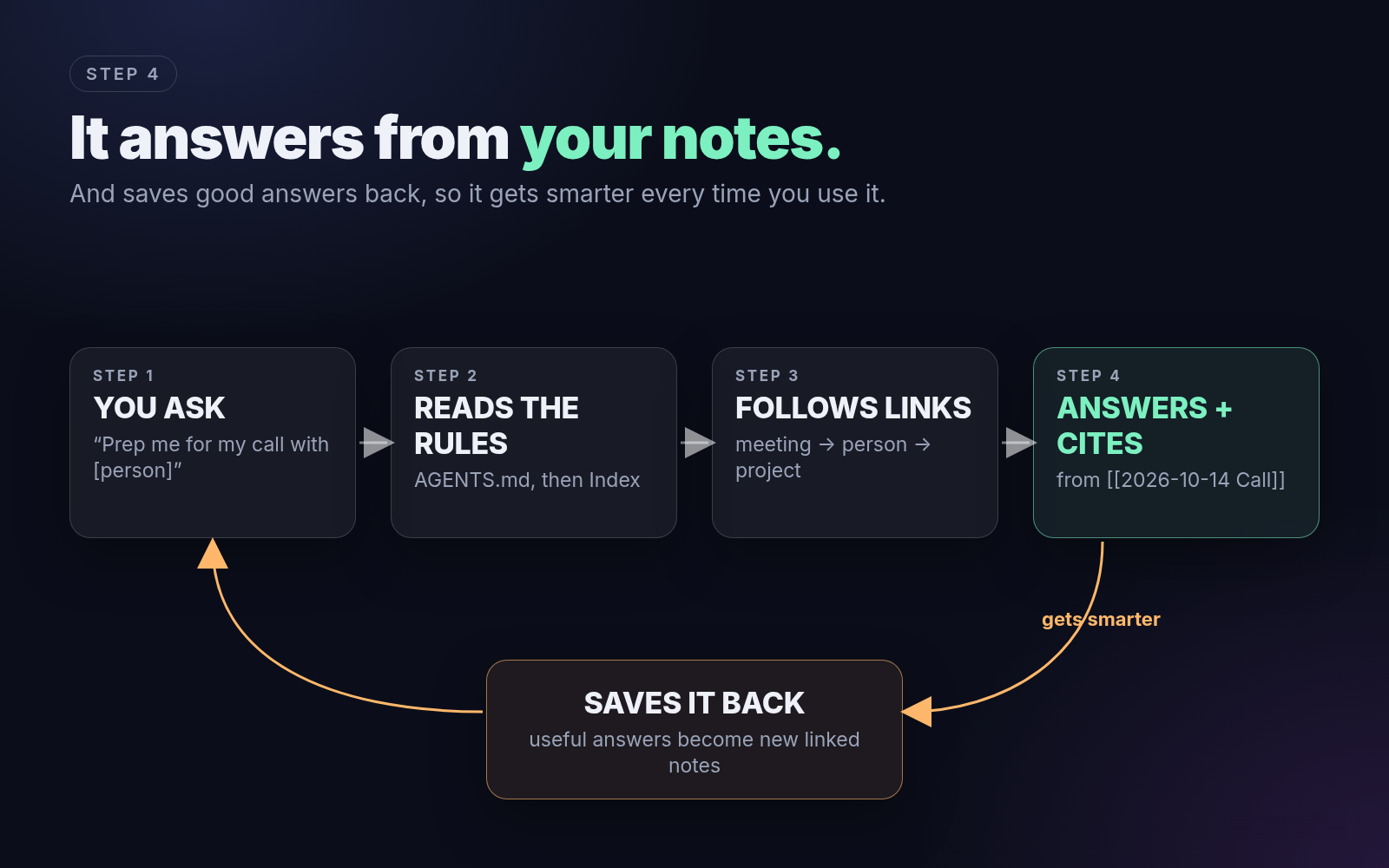
Agents that read AGENTS.md already follow these rules. In a chat app, or any time answers drift, paste this before your question:
The ask promptask-prompt.txtDownload Answer only from the notes in my vault. Start at Index.md, then open only the notes you need. Cite every fact with the [[note]] it came from. If it's not in the vault, say "not in the vault". Don't guess. If the answer is useful, save it as a new note in the right folder and link it to the notes you used. My question: [your question]That last part is why it gets smarter every day. Every good answer becomes a note the next answer can use. Try:
- "Prep me for my call with [person]. What did we decide last time, and what’s still open?"
- "Where is [project] at, and what’s blocking it?"
- "Who haven’t I followed up with in 2 weeks?"
- "List every to-do assigned to me from this week’s meetings."
 (opens full size in a new tab)
How we run it
On autopilot
Our vault lives on an always-on Mac. Grok Bot reads it, so when we ask about a person or a project, it answers from the vault and tells us which note it used. On a schedule, new calls and messages get filed into Meetings, People and Projects, and the vault gets tidied every night.
You don’t need any of that on day one. Run file it by hand for a week first. When you want it on autopilot, have your agent schedule file it (Claude Code and Codex can run on a schedule, or use cron or launchd on a Mac) and tidy every night.
This is the part where most people stall: connecting the sources, scheduling the filing, setting the rules for what it can send. If you’d rather skip to the finished version, our team builds it for you. Book a call with our team
When it gets messy
Quick fixes
- Same person twice ("Sam" and "Sam Lee"): "Find duplicate People pages, merge them into the full name, and fix every link."
- Meetings with no links: "List notes in Meetings/ with no [[links]] and link them to the right people and projects."
- Projects going stale: "List projects not updated in 30 days. Ask me for each: still active, waiting, or done?"
- Graph looks like a hairball: that’s normal. Use Index.md as the front door, not the graph. Ask: "Rebuild Index.md grouped by active projects, with the people on each."
- Answers feel generic: your AI isn’t reading the rules. Check AGENTS.md (or CLAUDE.md) is in the vault root, and tell it to start at Index.md.
- Can’t find something: ask the AI instead of searching. If it can’t find it either, it was never filed. Drop it back in Inbox.
Rule of thumb: if you’d have to explain it to your AI twice, it belongs in the vault.
Do this now
The next 10 minutes
- Download Obsidian and make the vault with Inbox, Meetings, People and Projects.
- Paste the filing rules into AGENTS.md in the vault root.
- Drop in one call transcript, say "file it", then ask your AI what you decided.
Safety
Keep it safe
- No passwords, card numbers or bank logins in your notes or chats.
- If you ever connect an AI to real accounts, make it ask before it pays, sends or deletes anything.
- Start small: one transcript, one week.
Done for you
Want it done for you?
Our team builds your AI second brain with you, around your meetings, people and projects.
Book a call with our teamWho it’s for
Founders, creators and small teams who want an AI that actually knows their business, without spending weekends wiring up vaults, sources and schedules.
What you get
- Your vault, structured around your meetings, people and projects
- Your existing calls and notes filed in, so it starts with real context
- Your AI connected to the tools you already use, with approval rules so nothing goes out without your OK
- Filing and cleanup on a schedule, plus the daily accountability coach on top
- A walkthrough so you know exactly how to run it
What happens on the call
We look at how you work today, where your notes and calls live and what eats your week, and we tell you what we’d build first. If it’s a fit, we map out the build. If it’s not, you still leave with the plan.